Content you write vs. content you link
There are two ways content gets onto a Uniweb site. Knowing which one you're using answers a surprising number of everyday questions — "why isn't my change showing?", "why did this appear by itself?", "do I need to publish?" Most sites use both.
Content you write directly (the common case)
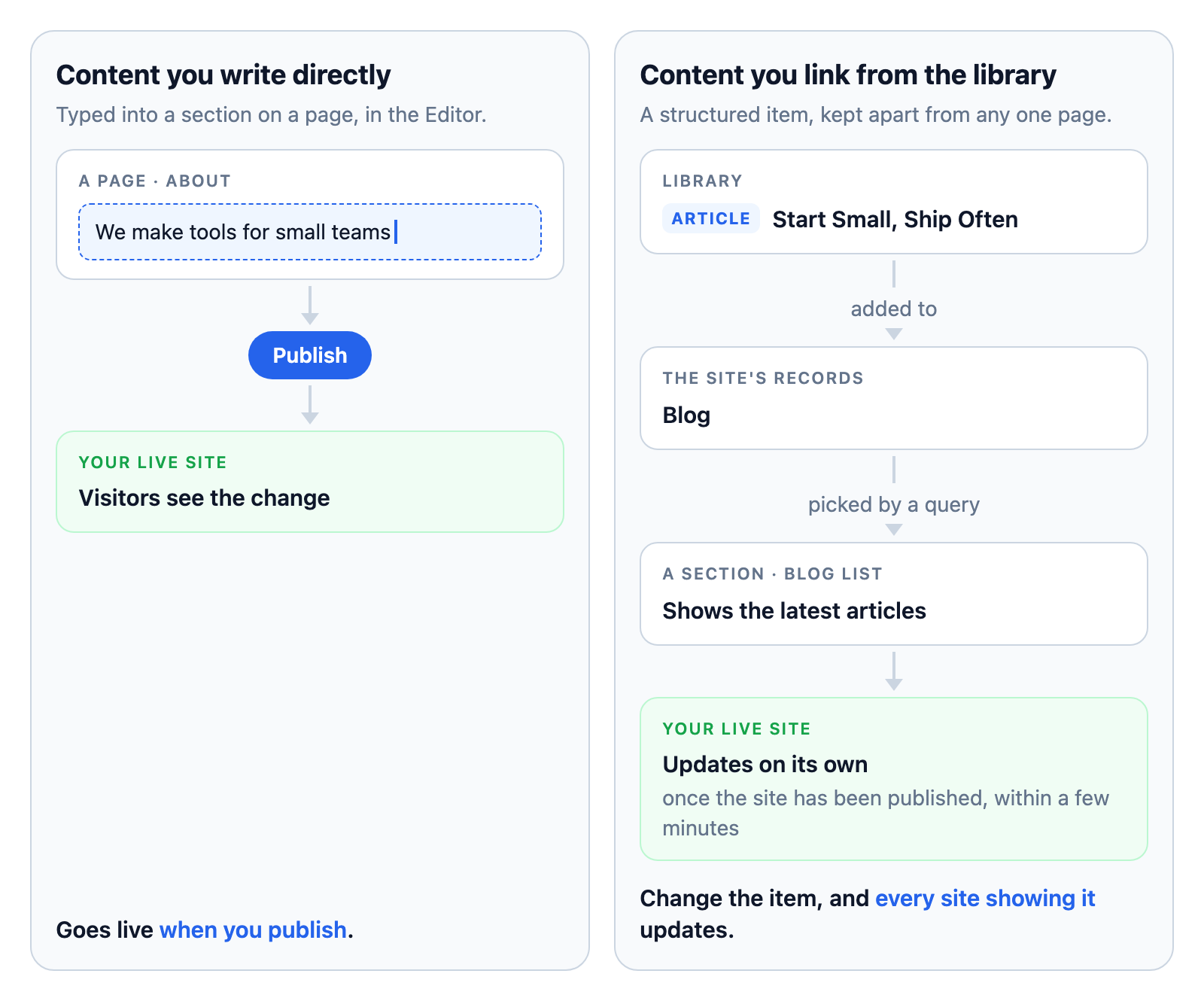
This is content you type into a section on a page: the words of your About page, the headline in a hero, an image in a feature. It:
- is edited in the Editor, right where it appears;
- can be as rich as the section allows — text, images, video, documents;
- goes live when you publish the site;
- is perfect for page content you control yourself.
When people say "editing my site," this is usually what they mean. If you change it and visitors don't see the change yet, the answer is almost always: publish.
Content you link from the library
Some content is better kept as structured items that live in your library — Articles, Events, People, Projects, and the like — separately from any one page. A section on your site then displays those items, through a query that picks them. This content:
- lives in the library, independent of the site;
- reaches a site through its folder — the site's Records view (you add items to a folder the site reads from);
- updates automatically — no republishing needed when the source item changes, once the site has been published with the site's live records feature on (a switch in its Settings → Features, where it's offered);
- is ideal for collections, collaboration, and anything that appears in more than one place.
Change a linked item and every site showing it updates on its own. Share the site with a colleague as a Contributor and their contributions to its Records appear on your site without their touching its pages.
Which should I use?
There's no single right answer — it depends on how you work. A rough guide:
| What you're adding | A good fit |
|---|---|
| Your About page copy | Written directly |
| A one-off landing page | Written directly |
| A blog several people contribute to | Linked (a folder others can add to) |
| An events calendar that changes often | Linked |
| Team bios you tweak now and then | Either — your call |
| A speaker list shared across several sites | Linked (update once, everywhere) |
Start by writing directly — it's the simplest path. Reach for linked content when you need live updates, collaboration, or the same content in multiple places.
Why this distinction keeps coming up
Three of the most common support questions are really this distinction in disguise:
- "I changed something but visitors don't see it." Written-directly content needs a publish. Linked content updates on its own — if it's not updating, check that the site's live records feature is on (Settings → Features, then publish), that it's actually linked content, that it's in the site's Records, and that the section's query picks it. See Troubleshooting.
- "Content appeared that I didn't add." Someone else with access to this site has added it to the site's Records — collaboration working as intended. Adjust who can contribute, or the section's conditions, to control what shows. See Folders.
- "I created an Article but it's not on my site." Library items exist on their own until you place them. Add the item to a folder the site reads from, and make sure a section's query lists that type. See Displaying content from the library.
Where to go next
- Writing content — for content you write directly.
- About the library — for content you link.
- Publishing your site — what publishing does and doesn't cover.